Tally TDL Tutorial: Add a Send-on-WhatsApp Button in 5 Minutes
The shortest path from a TallyPrime voucher to a customer's WhatsApp is a Tally TDL file.
One [#Form], one button, one function — and the voucher leaves the screen.
Here is the working anatomy, with the pitfalls you'll hit on day one.
What a Tally TDL actually is
Tally Definition Language is the scripting layer baked into TallyPrime. It is how every Tally screen,
report and voucher is described — and how third-party developers extend the product without forking it.
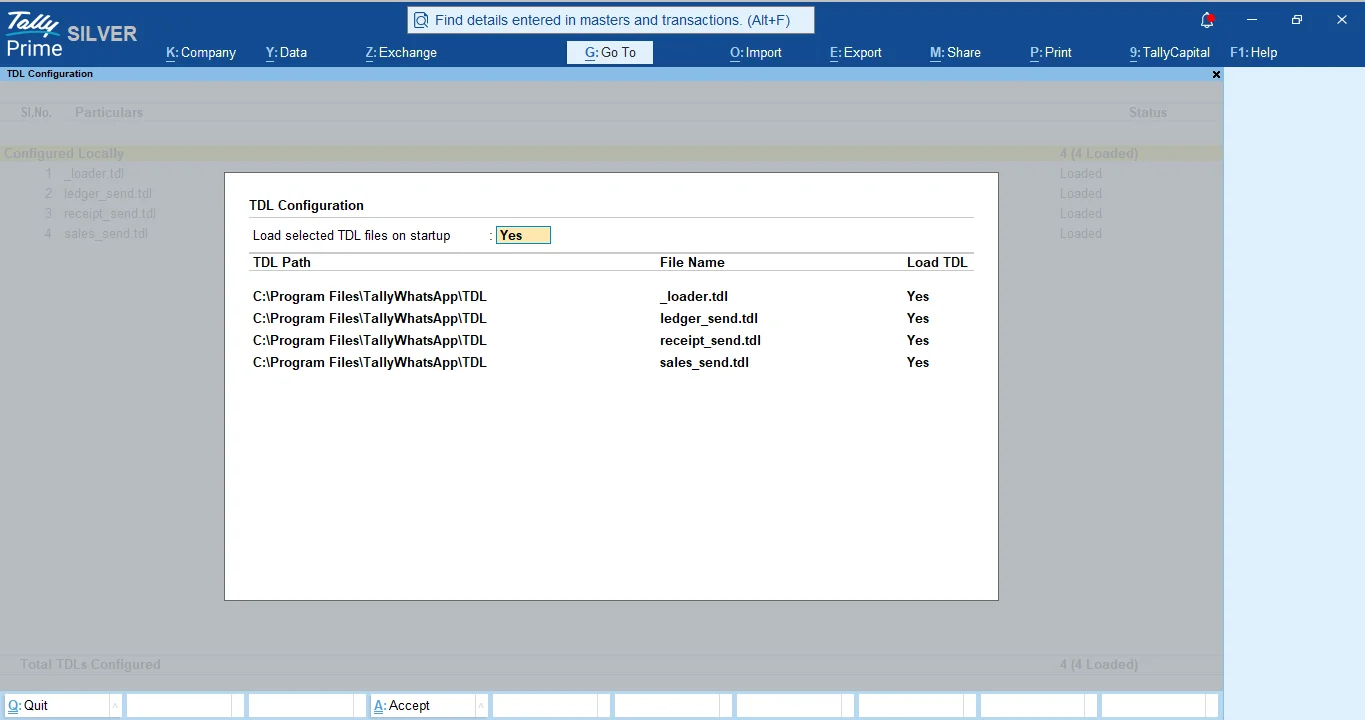
A TDL file is plain text, loaded at startup via tally.ini, and gets a chance to attach to
any form Tally renders.
For a Send-on-WhatsApp button, that's exactly the hook we need. Tally already exports a sales voucher to PDF in two lines. The TDL just has to add a button, ask the user to confirm, run the export, and hand the file off to something that can speak WhatsApp's protocol.
The minimal anatomy of a working hook
Every voucher hook in TallyWhatsApp follows the same shape:
[#Form: Sales Color]
    Add : Button : Send Sales WA Btn
    On  : Form Accept : Yes : CALL : TallyWASendSales

[Button: Send Sales WA Btn]
    Key    : Alt + J
    Title  : Send WhatsApp
    Action : Call : TallyWASendSales

[Function: TallyWASendSales]
    ; ... export PDF, then hand off via COM ...
Three blocks, three jobs. [#Form: Sales Color] is the override hook — the
# means "modify the existing form, don't redefine it." Tally's voucher screens are all
named after their colour scheme; the form that ships with TallyPrime for sales entry is
Sales Color. Receipt Color for receipts, Ledger Vouchers for the
ledger statement — different names, same pattern.
The Add : Button line attaches a clickable button to the form. The
On : Form Accept line wires the same function to fire when the user saves the voucher,
so the prompt appears on every Save without the user pressing the button. That's how
Tally TDL turns a manual "send invoice" workflow into a one-keystroke habit.
Why a tiny COM bridge beats reinventing HTTP
TDL is great at describing forms. It is not great at speaking modern protocols. The trick that makes the whole thing tractable is a single line:
Exec COM Interface:TallyWASend:##Contacts:##Path:##Msg:"sale":##VchGuidThat hands five strings to a registered COM object — the recipient list, the exported PDF path, the caption, the voucher type, and an idempotency key. The TDL stays small. The TallyWhatsApp connector on the same PC picks it up over local IPC and handles the actual WhatsApp send via the official Multi-Device protocol. No HTTP plumbing inside Tally, no third-party server in the loop.
The four pitfalls every TDL author hits
We shipped versions 1.0.7 through 1.0.9 of TallyWhatsApp in two days fixing exactly these. If you are writing your first Tally TDL, save yourself the loop:
- Alt+Q is not yours. It is TallyPrime's built-in Quit shortcut. Bind your button to a free key — Alt+J for vouchers, Alt+L for ledger reports.
- No
;;comments inside numbered step bodies. Tally's parser allows them only outside function blocks. A comment at line02of your function will fail the whole file with a T0008 error. - Stable
$Guidis also a trap. If you use it directly as the idempotency key, the user can never resend the same voucher. Suffix it with$$Nowso every deliberate click is a fresh send. - Forms named with overlay variants don't always exist. "DSP Ledger Vouchers" looked like a real form. It is not. Hook the canonical form name only.
Where to go from here
If you want to ship the same idea without writing a line of Tally TDL yourself, the easiest path is to install TallyWhatsApp — the MSI lays down three TDL files (sales, receipt, ledger) and registers the COM bridge for you. ₹999 one-time, one device activation, data stays on your PC. If you want to write your own TDL, the four pitfalls above will get you most of the way to a working build.
For the full delivery flow with screenshots, see How to Send Tally Invoices on WhatsApp Automatically.
Ship without writing TDL
Install TallyWhatsApp on your PC and the three TDL hooks land themselves. Pay ₹999 once.
Buy lifetime · ₹999 See how it works