How to Send Tally Invoices on WhatsApp Automatically
The moment you press Save on a TallyPrime sales voucher, the customer's phone should buzz with the PDF. No copy-pasting numbers into WhatsApp Web. No manual captions. Here is the working flow, step by step, on TallyPrime 4 and newer.
Why typing phone numbers into WhatsApp Web doesn't scale
The average TallyPrime user moves through 30 to 80 sales vouchers a day. The standard ritual — print to PDF, switch to WhatsApp Web, search for the customer, attach the file, type a caption — eats roughly 90 seconds per invoice. That is two billable hours a day burnt on a task no client ever asked for. TallyWhatsApp collapses it into one keystroke.
The 5-step flow
Once installed, the workflow becomes the same five steps every time. Featured below in order so Google can serve them as a snippet.
- Install the connector. Download the MSI from
tallywhatsapp.variantstudio.in and double-click. The Windows service registers
itself, the C# COM bridge installs, and three small TDL files land in
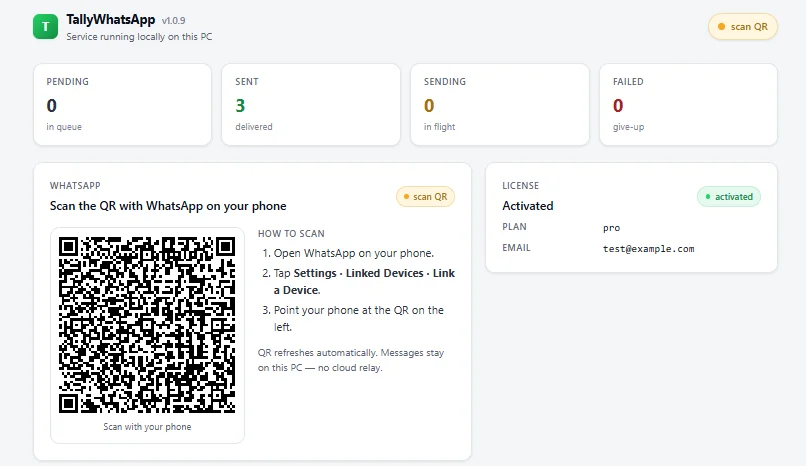
C:\Program Files\TallyWhatsApp\TDL.tally.iniis patched automatically — no manual config. - Pair WhatsApp once. Open the TallyWhatsApp dashboard from the system tray. Scan the QR code with the WhatsApp app on your phone, the same way you would for WhatsApp Web. The pairing is a single Multi-Device link; your phone stays the source of truth.
- Save a sales voucher in TallyPrime. Enter the voucher as you normally would and press Ctrl+A or Yes to save. The connector intercepts the save event.
- Confirm the send. A small TallyPrime dialog asks Send this sales invoice on WhatsApp? with Yes/No buttons. Press Y. The PDF is exported to a local folder, queued for delivery, and TallyPrime returns control to you instantly.
- The PDF lands on your customer's phone. Within a few seconds the invoice arrives on WhatsApp with a Hindi-English caption that includes the invoice number, date, amount and outstanding balance.
What works the same way
The same hook fires from three TallyPrime forms, with the same Yes/No confirmation:
- Sales vouchers — every GST invoice you raise. Receipt-style PDF, formatted by Tally itself.
- Receipt vouchers — payment confirmations to customers. The caption auto-fills the receipt amount and outstanding balance.
- Ledger statements — open Ledger Vouchers for any party and click Send Ledger WA (Alt+L). The full statement leaves as a PDF.
Behind the scenes a single TDL contract drives all three. If you are curious about the structure, we walked through the anatomy in our Tally TDL tutorial.
Common questions
Will my WhatsApp account get banned?
TallyWhatsApp uses the official Multi-Device protocol — your account is treated as a linked device exactly the way WhatsApp Web is. There is no scraping or policy bypass. The one real risk is WhatsApp's anti-spam system: sending hundreds of invoices back-to-back can flag any account and trigger a ~24-hour temporary restriction. We auto-space receipt vouchers about 90 seconds apart for this reason. Pace sales batches to customers who expect them and you stay well below the threshold.
Can I resend the same invoice?
Yes. Each deliberate click of Send WhatsApp is treated as a fresh delivery. The Yes/No prompt is the user confirmation point. Click Yes again, the customer gets it again.
Does it run on TallyPrime Silver and Gold?
Both. The connector is per-PC, not per-license type. Multi-company is fully supported.
Stop typing customer numbers into WhatsApp Web
Install once, pair once, send forever. ₹999 lifetime, one activation, data stays on your PC.
Buy lifetime · ₹999