WhatsApp Invoice Sharing: A GST-Compliant Guide for Indian SMBs
The most common question we hear from accountants: "Is sending a GST invoice on WhatsApp even legal?" Short answer: yes, and it has been since the GST framework took effect. The longer answer matters when an audit shows up. Here is what the rules actually require, and how to set up a compliant WhatsApp invoice workflow that doesn't bite you later.
What the GST law actually says about delivery
Section 31 of the CGST Act and the corresponding Rule 46 spell out what an invoice must contain — supplier GSTIN, recipient details, HSN code, taxable value, tax rate, signature or digital signature, and so on. Neither the Act nor the Rules dictate the channel of delivery. As long as the recipient receives a copy of the prescribed invoice, hand-delivery, courier, email and WhatsApp are all valid.
Rule 48(4) further allows electronic invoices in lieu of physical ones for B2B supplies above the e-invoicing threshold, with the IRN and QR code generated from the IRP portal. A WhatsApp PDF that carries the IRN-stamped invoice is therefore as compliant as a printed copy handed over the counter.
What a compliant WhatsApp send actually looks like
- The PDF itself is the compliance object. The format must contain every field Rule 46 lists. TallyPrime's default sales invoice template covers this out of the box; if you run a customised template, double-check the GSTIN, HSN, place of supply and signature blocks.
- Retain the source. The original voucher must remain in the seller's books for the statutory retention period (six years under Section 36). Sending it on WhatsApp does not replace storage — it supplements it. TallyPrime does the heavy lifting here automatically.
- IRN where applicable. If you cross the e-invoicing threshold, generate the IRN in TallyPrime before sending. A pre-IRN PDF is not a valid B2B invoice for a recipient claiming input tax credit.
- Caption need not duplicate the invoice. A friendly caption ("Aapka Sales Invoice INV-2026-0042 attach kiya hai") is courteous, not mandated. The PDF carries the legal weight.
The privacy angle most articles skip
Compliance is one half. Customer data protection is the other. When you ship a WhatsApp invoice through a cloud relay — most "Tally to WhatsApp" SaaS products do this — you are giving a third party your full customer phone book and a copy of every invoice you issue. Under the DPDP Act, that is a transfer to a data fiduciary you may or may not have a written contract with.
TallyWhatsApp takes the opposite approach. The connector runs on the same PC as TallyPrime, talks directly to WhatsApp's Multi-Device protocol, and never sends customer numbers, captions or PDFs through any third-party server. The only outbound traffic is the WhatsApp media upload itself — exactly the same network call WhatsApp Web makes from your browser. For a finance team that signs DPDP compliance attestations, that distinction matters.
A realistic 3-step compliant setup
- Confirm your invoice template includes all Rule 46 fields. Open F11 → Statutory and Taxation in TallyPrime and verify the GSTIN and HSN settings.
- Enable e-invoicing if your turnover requires it. Gateway → e-Invoice → Configuration. Generate an IRN at voucher save time.
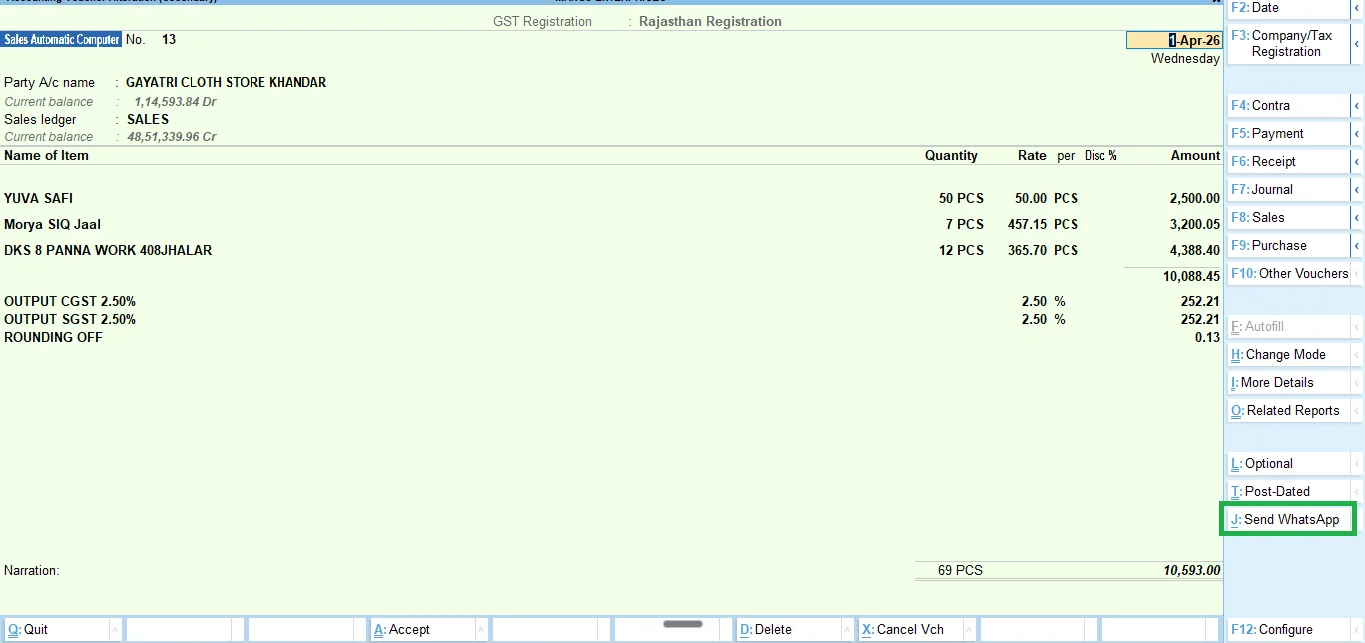
- Hand the PDF to a local sender, not a cloud relay. TallyWhatsApp installs in ~30 seconds and adds a Send WhatsApp button to sales, receipt and ledger forms — see the step-by-step.
Bottom line
Sending a GST invoice on WhatsApp is well within the GST framework. The compliance burden is on the invoice content and on retention, not on the delivery channel. Your job is to make sure the PDF is right, the original is stored, and your customer's phone number doesn't leak to a vendor who didn't sign your DPA. Set those three up once, then send invoices with one keystroke for the rest of the financial year.
Compliant WhatsApp delivery, ₹999 once
TallyWhatsApp ships invoices, receipts and ledger statements directly from your PC. No cloud relay, no shared customer database. Pay ₹999 once, get one device activation.
Buy lifetime · ₹999 Read the privacy details