Tally WhatsApp Automation: Send Invoices in One Click with TDL
Most TallyPrime users still dispatch invoices the same way: print to PDF, switch to WhatsApp Web, search the customer, attach, type, send. Forty times a day. Tally TDL WhatsApp automation collapses that ritual into a single keystroke — and it does it without a monthly API bill or your data leaving the building. Here is what it actually is, the flow that runs end to end, and where the limits sit.
The dispatch problem nobody costs out
Billing inside TallyPrime is fast — that's the whole point of the software. The slow part is what happens after Save. Each manual WhatsApp dispatch eats roughly 90 seconds: open the browser, log into WhatsApp Web, search the contact, download the PDF, attach, write a caption, send. At 40 invoices a day that's an hour gone. At 100 — standard for a mid-size distributor — it's nearly three hours of repetitive work, and the kind of work where mistakes compound: wrong PDF to wrong customer, wrong invoice number in the caption, payment delays because the buyer "never got the bill". That's the gap TallyWhatsApp closes.
What Tally TDL WhatsApp automation actually is
Tally Definition Language is the official customisation framework built into every copy of TallyPrime. It's how Tally Solutions itself extends the product, and it's the right tool to add a "Send WhatsApp" button to the Sales, Receipt and Ledger Vouchers screens. We covered the anatomy of a working hook in our Tally TDL tutorial — this post is about the automation that hangs off those hooks once they fire.
The TDL itself is small (under 200 lines, split across three files). The work happens in a Windows service that ships with the same installer: it pairs once with WhatsApp using the official Multi-Device protocol — your phone is the source of truth, the PC is a linked device, identical to WhatsApp Web. There is no third-party API provider, no per-message fee, no cloud relay.
The 7-step flow, end to end
- You save a sales voucher in TallyPrime. Press Ctrl+A as you always do. The TDL hook intercepts the form's accept event.
- A confirmation prompt appears. A small Tally dialog asks Send this sales invoice on WhatsApp? with Yes/No buttons. This is the user-confirmation point — nothing leaves your PC until you press Y.
- Customer number is read from the party ledger. The TDL pulls the WhatsApp number stored against the buyer's ledger. Update it once in Tally and every future invoice uses the new number.
- Tally generates a GST-compliant PDF. Using your existing invoice template — the same one you already print. No layout changes.
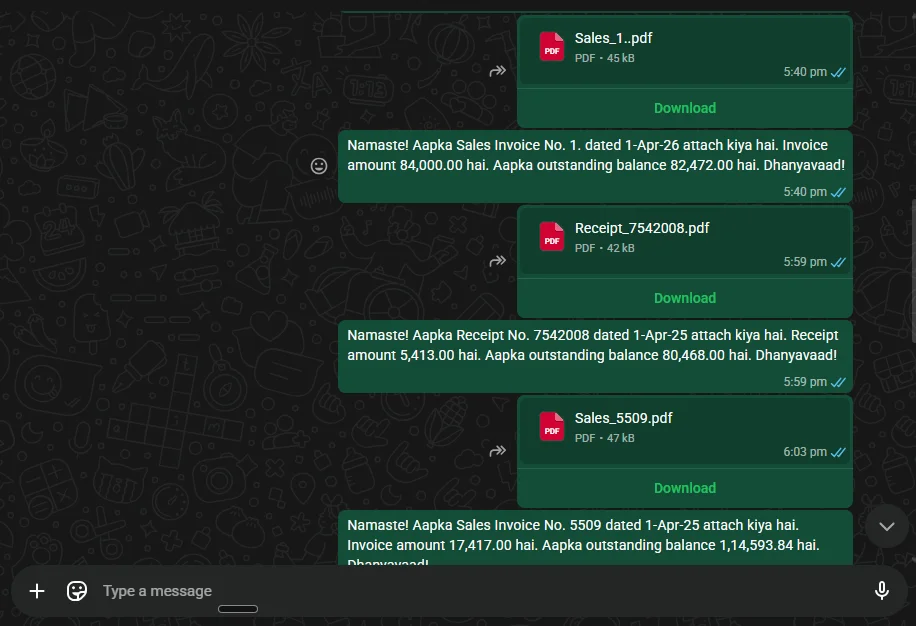
- The connector composes a Hindi-English caption. Invoice number, date, amount and outstanding balance are dropped into a template you can edit. Reflects what most Indian SMB customers actually expect to see.
- Multi-Device send fires. The PDF and caption ride out as a normal WhatsApp message from your linked number. End-to-end encrypted, delivered through Meta's infrastructure — exactly like WhatsApp Web.
- Customer's phone buzzes within seconds. The activity log inside the TallyWhatsApp dashboard records the send with a timestamp for your audit trail.
What's included — and what isn't
A clear-eyed list, because most of the comparison content out there mixes features with aspirations.
- Sales, Receipt and Ledger Voucher buttons. Three working TDL hooks ship
in the MSI:
sales_send.tdl,receipt_send.tdl,ledger_send.tdl. - One-click resend. The same Yes/No prompt is the resend trigger — every deliberate save is treated as a fresh send.
- Auto-pacing for receipt batches. Receipt vouchers are spaced ~90 seconds apart automatically. WhatsApp's anti-spam system flags accounts that blast hundreds of messages in a burst, so the connector throttles by default.
- Multi-company support. The button appears in every company file TallyPrime opens. No per-company setup.
- Local activity log. Every send is recorded on your PC with status, timestamp and ledger reference.
- Not included: bulk-blast tools, cold-outreach scripts, contact scraping, marketing broadcast lists. Those break WhatsApp's rules and we don't ship them.
Where the time savings actually come from
Three places, in descending order of impact:
- The context switch. Not having to leave TallyPrime is the single biggest win. Most accountants tab between Tally and a browser dozens of times a day; cutting that loop saves more than the typing itself.
- The lookup. Reading the WhatsApp number from the ledger eliminates the "search for the customer" step, which is also where most wrong-customer mistakes happen.
- The caption. A pre-templated caption with invoice number and outstanding balance is more useful to the buyer than a hand-typed "PFA" — and faster to produce.
Together that turns a 90-second-per-invoice ritual into a 2-second confirmation. For a 40-bill day, that's roughly an hour back. For a 100-bill day, closer to three.
Who this fits
- Wholesale and retail distributors moving 30–500 invoices a day
- FMCG, pharma, electronics and industrial dealers where invoice turnaround drives delivery
- CA firms running billing on behalf of multiple clients in TallyPrime
- Any TallyPrime user still copying customer numbers into WhatsApp Web
If you need bespoke per-customer caption logic ("Marathi for some buyers, Hindi for others, decided by ledger group") or workflows that touch Zoho or Razorpay too, we covered the tradeoffs in our TDL vs add-ons vs cloud tools comparison.
Common questions
Do I need WhatsApp Business API or a paid gateway?
No. TallyWhatsApp uses the official WhatsApp Multi-Device protocol — your existing personal or business number is paired exactly the way WhatsApp Web pairs. No third-party API account, no per-message fee.
Does my customer need to install anything?
No. Customers receive a normal WhatsApp message with the invoice PDF attached, just like any other WhatsApp message.
Will my WhatsApp account get banned?
The Multi-Device link itself is fully sanctioned by Meta — your account is treated as having a linked device, identical to WhatsApp Web. The real risk is WhatsApp's anti-spam system: blasting hundreds of invoices back-to-back can flag any account and trigger a ~24-hour temporary restriction. The connector auto-spaces receipt vouchers ~90 seconds apart for this reason. Pace sales batches and you stay well below the threshold.
Which version of TallyPrime does this work with?
TallyPrime 4.x and newer, including 5.x. Both Silver and Gold editions. Multi-company support is built in.
Where does my invoice data go?
Nowhere. The connector runs entirely on your PC. Voucher data, customer numbers and PDFs never leave your machine — there is no cloud relay and no telemetry.
Stop typing customer numbers into WhatsApp Web
Install once, pair once, send forever. ₹1,999 lifetime, one activation, data stays on your PC.
Buy lifetime · ₹999